In the dynamic world of visual technology, maintaining optimal performance of LED video walls is vital. Industry expert John Smith, an engineer with over a decade of experience, emphasizes, "Understanding how to troubleshoot LED video walls can save time and money." His insights highlight the importance of addressing issues quickly and efficiently.
When working with LED video walls, problems can arise unexpectedly. Color inconsistencies or flickering images can disrupt presentations. Regular check-ups are essential, yet many overlook minor glitches until they escalate. The art of troubleshooting requires both technical knowledge and a keen eye for details.
Implementing a systematic approach helps identify problems early. For example, checking power connections and signal integrity can prevent larger issues. However, even seasoned professionals can miss out on nuances. Reflecting on past mistakes can lead to better practices and solutions. Understanding how to troubleshoot LED video walls not only addresses current problems but also enhances overall performance.
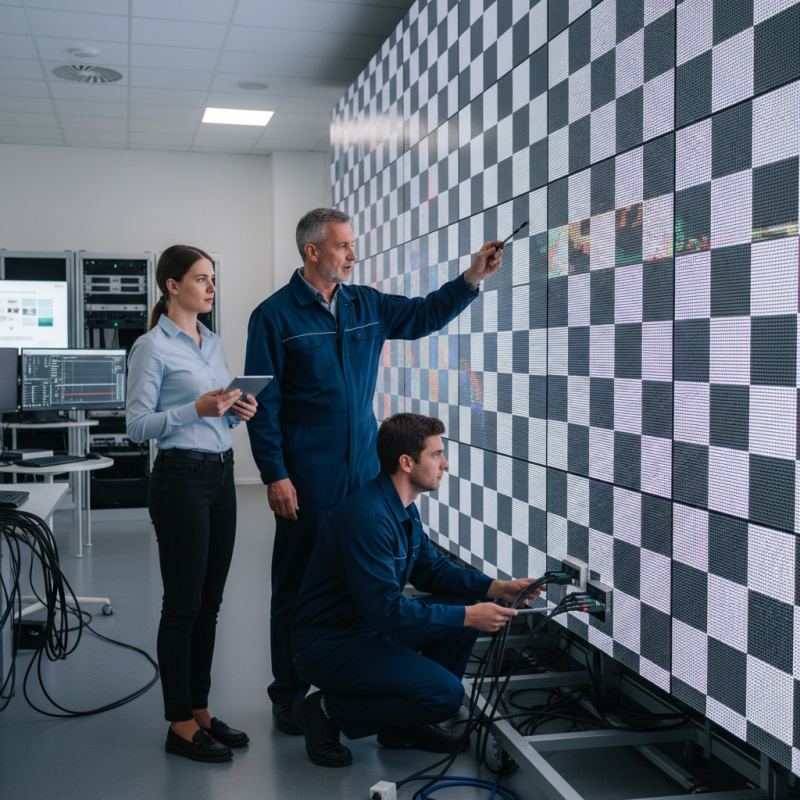
LED video walls are intricate systems composed of various components that require careful maintenance. Understanding these parts can help in troubleshooting common issues. For instance, the LED modules, power supply units, and control systems all play critical roles. Research indicates that around 15% of failures come from power supply malfunctions, which can lead to dim images or fluctuations.
When facing issues like dead pixels or color inconsistencies, conduct a thorough visual inspection. Often, these problems arise from poor connections or alignment issues. Clean the surface of the panels regularly. Dust buildup can affect brightness and contrast, leading to suboptimal performance.
Tip: Perform routine maintenance checks every month. This includes examining connections and recalibrating the settings for consistent display quality. Keep a checklist handy for these inspections.
Climate factors can also influence functionality. High humidity or extreme temperatures may cause irregular performance. Incorporating environmental controls can mitigate these risks. Remember that even minor changes in configuration can yield significant results. Consistent observation and adjustment are key to maintaining optimal performance in LED video walls.
When troubleshooting LED video walls, start by assessing color accuracy. An unbalanced color spectrum can cause visuals to appear unnatural. Look for signs of color bleed or uneven hues across the display. A thorough calibration may help rectify these issues. Often, improper connections or faulty source material lead to these problems. Check cable connections and use high-quality input sources.
Brightness levels are another critical factor in video wall performance. If the screen seems dim or washed out, adjust the brightness settings. Environmental factors, such as ambient light, can also impact perceived brightness. Test in different lighting conditions. Sometimes, the ideal brightness setting varies with different content types. An inconsistent brightness across panels can frustrate viewers. Regular maintenance can help in ensuring even brightness across the display.
Clarity and sharpness are paramount for engaging visuals. Blurry images can distract from the message. Inspect the resolution settings of the content displayed. Lower-quality inputs can diminish clarity. Remember that even the best technology can have limitations. Occasionally, a panel might have defects that affect clarity. Regularly evaluate each panel's performance to maintain an optimal viewing experience. Frequent reflection on these points can lead to improved overall results.
Troubleshooting connectivity issues with LED video walls involves a careful examination of both hardware and signal sources. Many problems originate from loose cables or poor connections. Check all input and output cables to ensure they are securely attached. Inspect connectors for damage and replace any faulty components. Sometimes, even minor disconnections can cause major display problems. A systematic check can prevent larger issues before they escalate.
Signal sources are equally crucial in achieving optimal performance. Ensure the source devices, like computers or media players, are functioning correctly. Test different input sources to identify potential faults. Each device might require specific settings for seamless integration with the video wall. Confirm that resolutions and refresh rates are compatible. This attention to detail can often resolve display anomalies.
Technical glitches can still occur despite thorough checks. It’s essential to keep a log of recurring issues and responses. Patterns may emerge that highlight the root of ongoing problems. This approach fosters a deeper understanding of the entire system. Regular monitoring guarantees sustained performance and minimizes downtime. Being proactive is key to addressing unexpected outages effectively.
Effective maintenance practices for LED video walls are essential for optimal performance. Regular inspections can catch potential issues early. Check connections, look for loose cables, and test power supplies. A small problem can quickly escalate, leading to bigger repairs. Cleaning the display is equally vital. Dust and dirt can obstruct images. Use a microfiber cloth and a gentle cleaning solution for best results.
Temperature control matters too. LED panels can be sensitive to heat. Ensure proper ventilation around the wall. Consider installing a temperature monitor.
Another area often overlooked is software updates. Keeping the firmware current ensures reliability. A missed update can lead to glitches. Documenting maintenance activities helps in identifying patterns.
Training staff on basic troubleshooting is crucial. They should know how to reset systems and check inputs. It fosters a proactive culture that can prevent downtime. However, it's important to remember that not every issue can be fixed in-house. Sometimes, calling in experts for complex problems is necessary.
Optimizing calibration settings is vital for enhancing the performance of LED video walls. Proper calibration ensures accurate color representation, brightness uniformity, and overall image quality. A well-calibrated display offers a compelling visual experience, helping to engage audiences effectively.
Tips for calibration include regularly checking brightness levels. Adjusting brightness can reduce eye strain and improve visibility in different lighting conditions. Ensure that white balance is accurately set. This can create a more natural viewing experience. Color temperature should also be consistent across the entire panel. Inconsistencies can lead to distracting visual artifacts.
It’s important to remember that calibration is not a one-time task. Regular adjustments may be needed due to environmental factors and usage patterns. Consider exploring advanced calibration tools. These can help facilitate more precise adjustments. However, even basic manual calibration can make a significant difference. Some settings might not produce perfect results immediately. It’s common to revisit and tweak these settings for optimal performance.
| Calibrated Parameter | Recommended Value | Current Value | Adjustment Needed | Comments |
|---|---|---|---|---|
| Brightness | 600 nits | 550 nits | Increase by 50 nits | Too low for daytime viewing. |
| Contrast Ratio | 3000:1 | 2500:1 | Increase by 500:1 | Need to enhance color depth. |
| Color Calibration | sRGB | Adobe RGB | Switch to sRGB | Inconsistent color reproduction. |
| Gamma Setting | 2.2 | 1.8 | Adjust to 2.2 | Images appear too dark. |
| Refresh Rate | 60 Hz | 60 Hz | No adjustment needed | Stable performance. |
: LED video walls consist of LED modules, power supply units, and control systems. Each is vital for performance.
Common issues include dead pixels, color inconsistencies, and dim images. These can stem from poor connections.
Routine maintenance checks should be done every month. This includes inspecting connections and recalibrating settings.
High humidity and extreme temperatures can lead to irregular performance. Environmental controls can help mitigate these effects.
Examine all cables and connections for security and damage. Even minor disconnections can lead to major problems.
Ensure the source devices function properly. Compatibility in resolutions and refresh rates is crucial for seamless operation.
Test different input sources and check settings. Paying attention to details often resolves issues effectively.
Keep a log of ongoing problems and responses. Recognizing patterns can help identify root causes.
Being proactive reduces unexpected outages and ensures sustained performance. Regular observation is key in this process.
Inspect connections and clean panel surfaces. Dust buildup can negatively affect brightness and contrast.
In "How to Troubleshoot LED Video Walls for Optimal Performance," the article delves into the essential components of LED video walls and highlights common issues that may arise. Understanding the key components is crucial for effectively diagnosing display problems, such as discrepancies in color, brightness, and clarity. Additionally, troubleshooting connectivity issues and signal sources plays a pivotal role in maintaining seamless operation.
The article emphasizes effective maintenance practices that can prolong the lifespan of LED video walls, along with optimizing calibration settings to enhance overall performance. By following these guidelines on how to troubleshoot LED video walls, users can ensure their displays operate at peak efficiency and deliver stunning visual experiences.

LYRA LED