What is transparent LED technology, and how can a screen display vivid images while still letting people see through it? The answer begins with its structure. Unlike a conventional display with a solid backing, a transparent LED screen uses LED pixels mounted in spaced rows or modules. The open areas between them allow light to pass through the glass or supporting structure. When the pixels switch on, they form text, video, or graphics. When they remain dark, the background stays partly visible.
The trade-off is real. Wider gaps can improve transparency, but may make images look less dense. Tighter pixel spacing can sharpen content, yet reduce the view through the screen. Brightness, viewing distance, ambient light, and installation conditions all affect the result. A storefront facing midday sun, for example, needs different settings from an indoor display beside a dim corridor. There is no single configuration for every site.
For context, the U.S. Department of Energy’s Energy Saver guidance states that LED lighting uses at least 75% less energy than incandescent lighting. That figure applies to LED lighting generally, not specifically to transparent displays, whose power use depends on design and operating conditions. It offers a useful reference, not a direct product comparison. Transparent LED technology combines solid-state light sources, control electronics, and carefully spaced pixels. The engineering is impressive, but transparency alone does not guarantee clear viewing or low energy use. Practical testing matters.
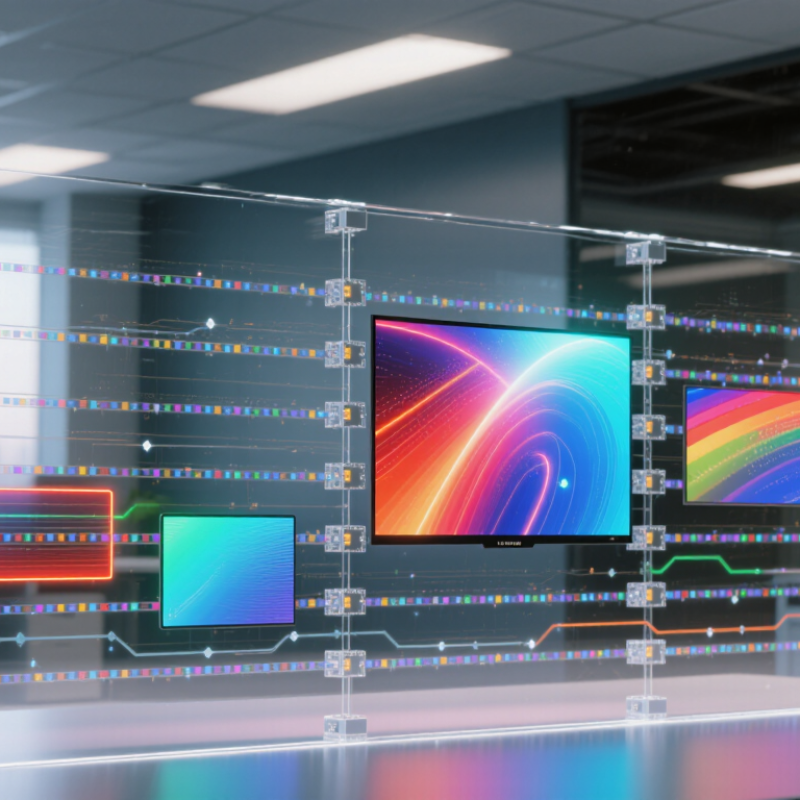
A transparent LED display is not a clear screen with light shining through it. It is a grid of LED packages mounted on narrow circuit strips, with open gaps between pixels. Driver circuits control the LEDs, while a controller sends image data through signal cables. Power supplies and a supporting frame complete the assembly. The gaps matter. They allow viewers to see objects behind the screen, but they also reduce the area available for pixels. Pixel pitch, strip width, and viewing distance all affect how solid an image appears.
The transparent look comes from this open structure, not from the LEDs themselves. A closer pixel spacing can produce finer detail, yet may make the display less see-through. Daylight also matters: bright surroundings can wash out images, so installation teams need to assess contrast at the actual site. “Transparent” can be a slightly misleading label; visibility varies with design and viewing angle.
Grand View Research valued the broader global LED-display market at US$7.53 billion in 2023. Its 2024–2030 forecast projects an 11.4% compound annual growth rate.
That report covers LED displays broadly, not transparent panels alone, so it should not be read as a market estimate for this specific structure.
A transparent LED display uses tiny light-emitting diodes mounted on a clear supporting layer, such as glass or polymer. Each diode produces light when electrical current passes through its semiconductor layers. Red, green, and blue diodes combine at a pixel to create different colors. The spaces between pixels allow viewers to see through the screen. Small gaps matter. Wider spacing usually preserves more transparency, while denser pixels can show finer detail. Conductive traces carry power and signals across the display, though they may be visible at close range. In practice, balancing clarity, brightness, and transparency is not perfectly simple.
Control electronics determine when each pixel lights and how brightly it shines. A controller sends image data to driver circuits, which switch individual LEDs on and off rapidly. Adjusting each color channel creates the intended shades and moving images. Power supply design matters, too: unstable current can cause uneven brightness or visible flicker. Heat needs attention. Although LEDs generate less heat than some older display technologies, tightly packed components still require careful thermal management. Installers may also adjust brightness and color balance for ambient light, viewing distance, and camera use. Those settings can improve readability, but they cannot remove every reflection or make a transparent display look like a solid screen.
Transparent LED displays turn electrical data into tiny points of colored light. A controller receives image information and divides it into instructions for individual pixels. Each pixel contains red, green, and blue light-emitting elements, though layouts vary by display design. A driver circuit controls the current flowing through each element. More current usually makes an LED brighter, within safe operating limits. The three colors blend in the viewer’s eye to create many shades. Not magic.
To show motion, the controller updates these instructions many times per second. Some displays adjust brightness by rapidly switching LEDs on and off; others use different control methods. Clear gaps between pixels let ambient light pass through, while lit pixels form the image. A dark scene may therefore look more transparent than a bright, detailed one. The explanation sounds neat, but real displays involve trade-offs: pixel spacing, viewing distance, brightness, and color accuracy all affect what people see. In a bright room, reflections can wash out fine details. Engineers test images from several angles, because a pixel that looks vivid head-on may appear weaker from the side. The signal creates the pattern; the room helps decide how convincing it feels.
Transparent LED displays work by placing tiny light-emitting diodes on narrow bars, wires, or a mesh rather than across a solid panel. The gaps between those elements remain physically open, so daylight and views can pass through. Think of a fine screen door: the lit points form an image, while the unlit spaces preserve visibility. The proportion of open area depends on pixel pitch, diode size, and support structure. Smaller gaps can sharpen the image, but they may also reduce the amount of light passing through.
At close range, the supports and individual pixels are easier to see. From farther away, they blend into a continuous picture. That trade-off matters in shop windows and glass partitions, where sunlight, reflections, and changing viewing angles affect contrast. Daylight still gets through. But the display can make a bright window harder to read, and the open structure does not guarantee a clear view in every condition. The International Energy Agency’s Tracking Buildings 2023 report estimates that buildings account for about 30% of global final energy consumption. Transparent screens can help retain daylight in some applications, but actual energy savings depend on lighting controls, screen brightness, and how the space is used. A measurement under real site conditions is wiser than relying on appearance alone.
Transparent LED panels balance two competing goals: letting viewers see through the display and forming a clear image. The spacing between LED pixels matters. Wider gaps let more daylight through, but fine text and thin lines may look broken up. Closer pixel spacing can sharpen detail, though it often reduces the open area and transparency. There is a trade-off.
Viewing distance changes what “clear” means. From across a lobby, a logo may appear smooth; up close, individual points of light become visible. Ambient light matters too. Bright windows and reflections can wash out colors, so panel brightness and contrast should match the actual site, not a dark showroom. LEDs also cannot create true black: darker areas may still reveal the scene behind the screen.
The supporting glass, tint, and installation angle can change perceived transparency. A slight reflection may seem minor in a sample, then become distracting beside a sunlit window. Content design matters as well. Bold lettering, clean shapes, and generous spacing tend to stay readable better than fine detail. Transparency figures deserve scrutiny. Check how they were measured, and view a sample at the intended distance and lighting. This step is easy to skip, and expectations can drift.
| Factor | What It Means | Typical Values or Relationship | Effect on Transparency and Image Quality |
|---|---|---|---|
| LED pixel pitch | The center-to-center distance between neighboring LED pixels, usually stated in millimeters. | Transparent displays commonly use pitches of approximately 3–10 mm. A smaller pitch places more pixels in a given area. | A smaller pitch generally improves detail and viewing at closer distances, but can require more LEDs and may reduce the open area available for viewing through the screen. |
| Open-area ratio | The proportion of the display surface left open between LED strips, modules, or other structural elements. | Often around 40–80%, depending on pixel pitch and construction. The exact figure is product- and measurement-method dependent. | A higher open-area ratio usually improves the view through the display and allows more light to pass, but can make the displayed image look less dense or less uniform. |
| LED density | The number of pixels per unit area. For a regular square pixel grid, approximate pixel density is calculated as (1,000 ÷ pitch in mm)2 pixels per m2. | For example, a 5 mm pitch corresponds to approximately 40,000 pixels per m2; a 10 mm pitch corresponds to approximately 10,000 pixels per m2. | Higher density can produce finer text and images. It often means more hardware in the viewing area, which can reduce transparency and increase processing or power requirements. |
| Brightness | The light output of the display, usually measured in candelas per square meter (cd/m2), also called nits. | Depending on the installation, transparent LED displays may be specified from roughly 3,000 to 6,000 nits or higher for bright environments. | Greater brightness can help the image remain visible in daylight, but does not increase physical transparency. Excessive brightness may cause glare or wash out image detail. |
| Ambient light and contrast | Ambient light is the light surrounding the display. Contrast describes how clearly bright and dark image areas can be distinguished. | Strong daylight or bright backgrounds can reduce perceived contrast, even when the display itself is operating correctly. | High ambient light can make dark colors appear lighter and reduce image impact. Careful brightness adjustment and suitable content can improve legibility. |
| Viewing distance | The distance between the viewer and the display. | At greater distances, individual pixels are less noticeable. The suitable distance depends on pixel pitch, content, and viewer needs. | A coarser-pitch display can look acceptable from farther away but may appear pixelated up close. A finer pitch is generally better for close viewing. |
| Viewing angle | The range of horizontal and vertical angles from which the image remains viewable. | Specified angles vary by LED package and display structure; image brightness and color can change as the viewer moves off-axis. | A wider viewing angle helps more people see the image from the side. Structural elements and LED optics can affect both off-axis image quality and the view through the display. |
| Display placement and background | The position of the screen relative to windows, daylight, interior lighting, and objects behind it. | There is no single typical value; brightness, background color, and distance from the display all influence the result. | A bright or visually busy background can reduce image readability. The same screen may appear more transparent against a bright scene and more visually dominant against a darker scene. |
| Refresh rate and image processing | Refresh rate is how often the displayed image is updated. Processing also affects scaling, color, and motion rendering. | Refresh rates are specified in hertz (Hz); suitable settings depend on the display electronics, content, and camera use. | Appropriate refresh and processing can reduce visible flicker, motion artifacts, or camera banding. These settings affect image presentation, not the display’s physical open-area ratio. |
| Glass and installation layers | Any glazing, protective layer, or additional structure placed in front of or behind the LED display. | Visible-light transmission depends on the glazing and installation. Multiple layers can reduce total transmitted light. | Additional layers may introduce reflections, glare, or reduced light transmission, affecting both the apparent transparency and image contrast. |
| Content design | The colors, text size, graphics, and amount of detail used in the displayed material. | Large, high-contrast graphics are generally easier to read than small text or fine detail, particularly at a distance. | Simpler layouts can remain legible while preserving the view through open areas. Full-screen bright content tends to make the display appear less transparent while it is on. |
Note: Values are representative engineering ranges, not universal specifications. Actual transparency and image quality depend on display construction, measurement conditions, installation, and viewing environment.
Red, green, and blue diodes combine at each pixel. Electrical current makes the tiny diodes emit light.
Open spaces between pixels let viewers see through the supporting glass or polymer. Wider gaps usually allow more light through.
Often, yes. Closer pixels can sharpen text and thin lines, but they may reduce transparency.
Individual points of light become easier to see at short distances. Across a lobby, the same image may appear smoother.
Yes. Sunlight and reflections can wash out colors, so brightness and contrast should suit the actual location.
No. Dark areas may still reveal the scene behind the display. That can make some images look less solid.
Bold lettering, clean shapes, and generous spacing are usually easier to read. Fine details may break up.
View a sample at the intended distance and lighting, and ask how transparency was measured. A showroom sample can mislead. It is easy to overestimate.
What is transparent LED technology? It is a display method that forms images with light-emitting diodes arranged across a clear or open structure. A transparent LED display typically includes a supporting frame, rows of LED pixels, control circuits, and a power system. The diodes produce colored light, while the control circuits receive image data and adjust each pixel’s brightness and color. By coordinating these electrical signals, the display creates moving images, text, and patterns.
Unlike a solid screen, a transparent display leaves spaces between its LEDs. These gaps allow some light to pass through, so viewers can see objects or surroundings behind the screen. Transparency and image quality depend on factors such as LED spacing, pixel density, brightness, viewing distance, and the amount of ambient light. A denser arrangement can create sharper images but may reduce visibility through the display, while wider gaps can improve transparency but make details less distinct.
LYRA LED